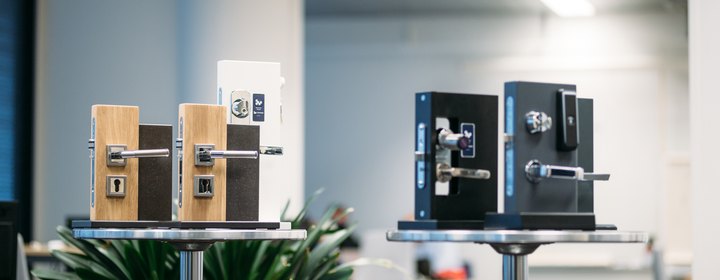
Bitwards solutions: Mobile Access, Mobile ID and Technology Licences

Mobile Access
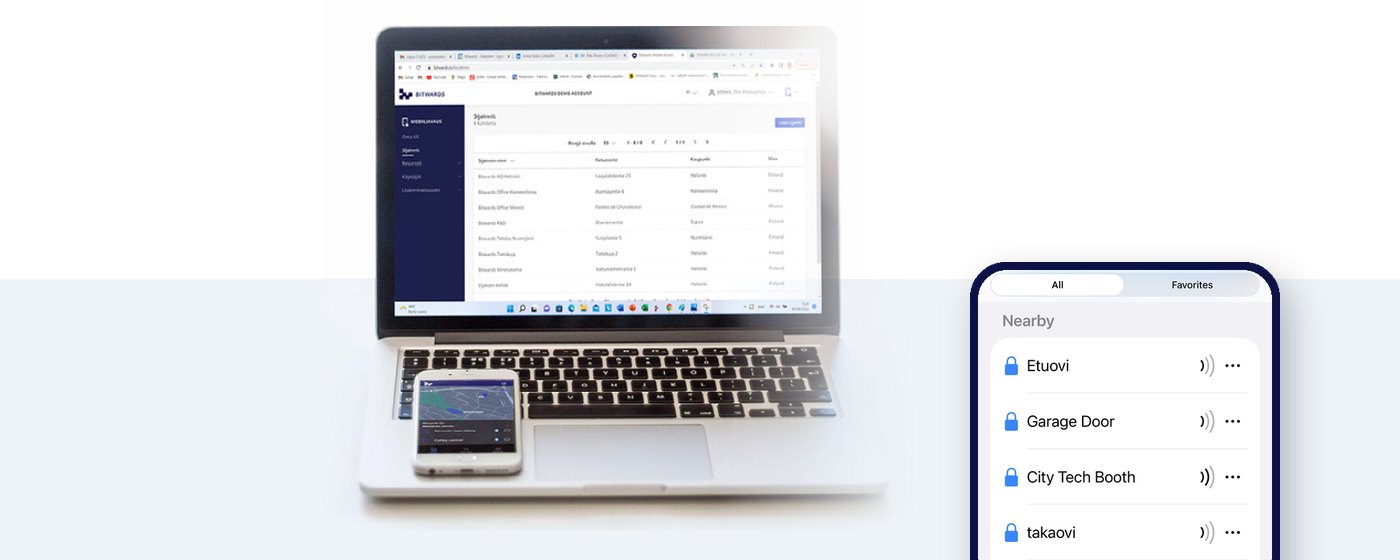
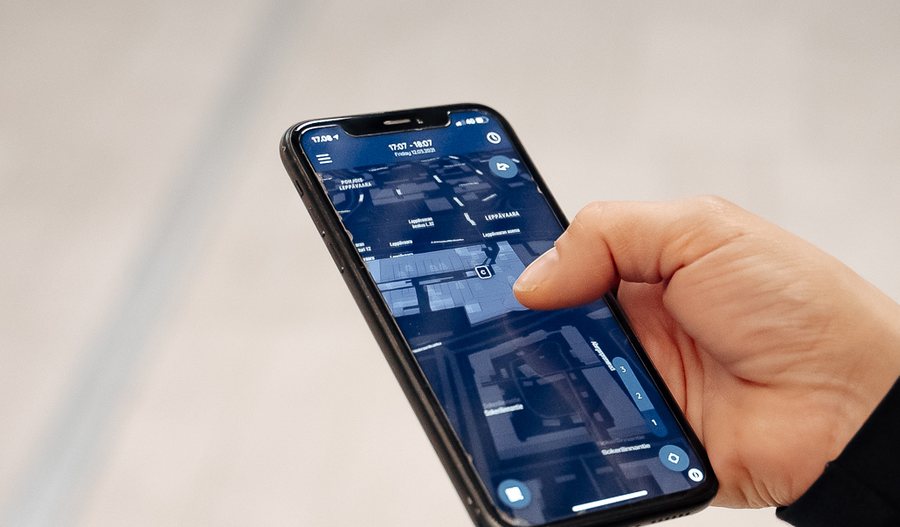
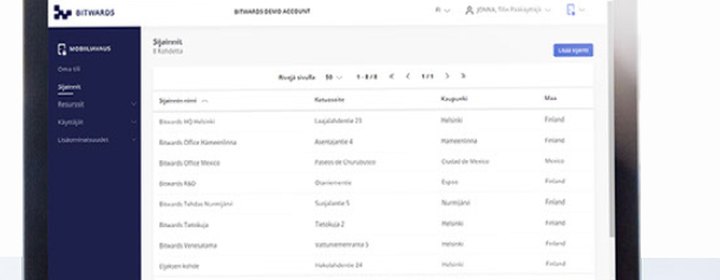
A laptop showing the Bitwards cloud dashboard with the sites list, and the app on a phone beside it listing the doors it holds keys to

The key to every door is already in your pocket.

Keys get copied. Cards get lost. Both take a trip to the facility desk to replace. Mobile Access replaces them with something everyone already carries and nobody lends out — their phone. Access rights are created in a web browser and delivered to the phone within seconds. The phone opens the door over Bluetooth or NFC and, crucially, carries the access intelligence to the door — so the door itself needs no cabling and no network connection.
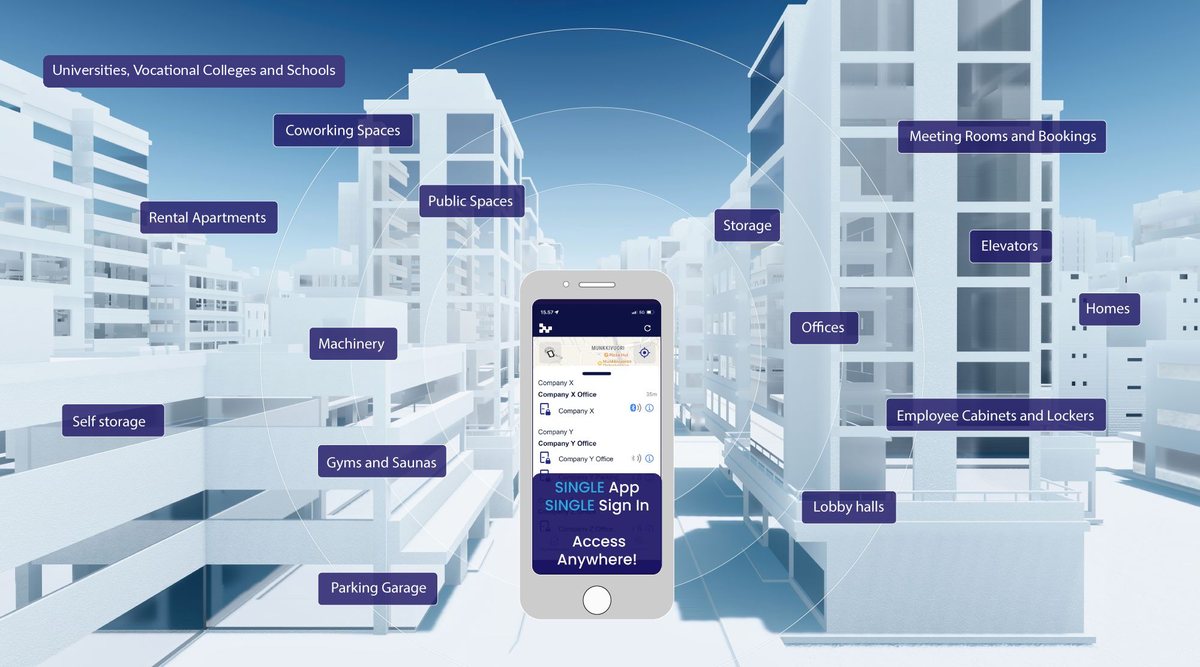
A cutaway of a city block showing the spaces Bitwards opens: universities, vocational colleges and schools, coworking spaces, rental apartments, public spaces, storage, meeting rooms, lifts, offices, gyms and saunas, parking, lockers and lobby halls — all from one app with a single sign-in
One app, one sign-in, access anywhere. The same platform runs a single shared front door and a campus with tens of thousands of mobile users — you add locations, doors and people as you go.

All-in-One Access Control — Unwired

Controller, reader and service in one package for any door. Scale it to any door one by one, fast and easy.

The web service

The browser-based management portal. Sites, doors, people, rights, schedules and reports — for one property or a whole portfolio, under a single login.

The mobile apps

The Bitwards Mobile Key app for iOS and Android — the user's key, the administrator's field tool and the installer's commissioning tool, in one download.

The devices at the door

Smart locks, cabinet locks, door controllers, adapters and readers from the manufacturer of your choice — new installations or retrofits onto existing doors. None of them is connected to anything: each is self-sufficient and makes its own decisions, because the intelligence arrives in the token the phone presents.

FeatureBusiness ProBusinessBasic
Cloud-based access control✓✓✓
Mobile access and mobile keys✓✓✓
Time schedules and door controls✓✓✓
Tenant Access Manager✓✓✓
Microsoft Entra ID / AD integration✓✓✓
Third-party API✓✓✓
Access codes (keypad)✓✓—
RFID card support✓——
Elevator control *✓——
Alarm system control *✓——

* Optional — please ask for detailed specifications. Access codes and cards can also reach the door over an optional network connection instead of by phone. Battery-powered locks for mechanical doors are supported alongside these controllers.


What “Unwired” actually delivers

Six things follow from taking the infrastructure out. They're the reason this isn't just a cheaper version of what you already have.

01

Zero infrastructure

No cabling, no controller cabinets, no local hubs or gateways. The phone carries the credential, so nothing has to bridge the gap between the lock and the cloud.

02

Keys manage themselves

Permissions move like email. Connect your HR or student system and access is created, changed and withdrawn as part of normal user management.

03

Owners and tenants both keep control

Tenant Access Manager separates the two properly: you set the boundaries of the building, each tenant manages their own people without you seeing their staff list. That's a GDPR benefit as much as a convenience.

04

Works when the network doesn't

The phone carries a time-limited, encrypted token; the lock checks it locally and decides on its own. The audit trail travels back to the cloud in the same pocket.

05

Coexists with what you own

This isn't a rip-and-replace. Existing wired systems keep running and gain mobile credentials alongside, so you extend rather than write off.

06

Access as a service

For partners this changes the business model, not just the product: recurring software revenue instead of one-off installation income.
Mobile ID
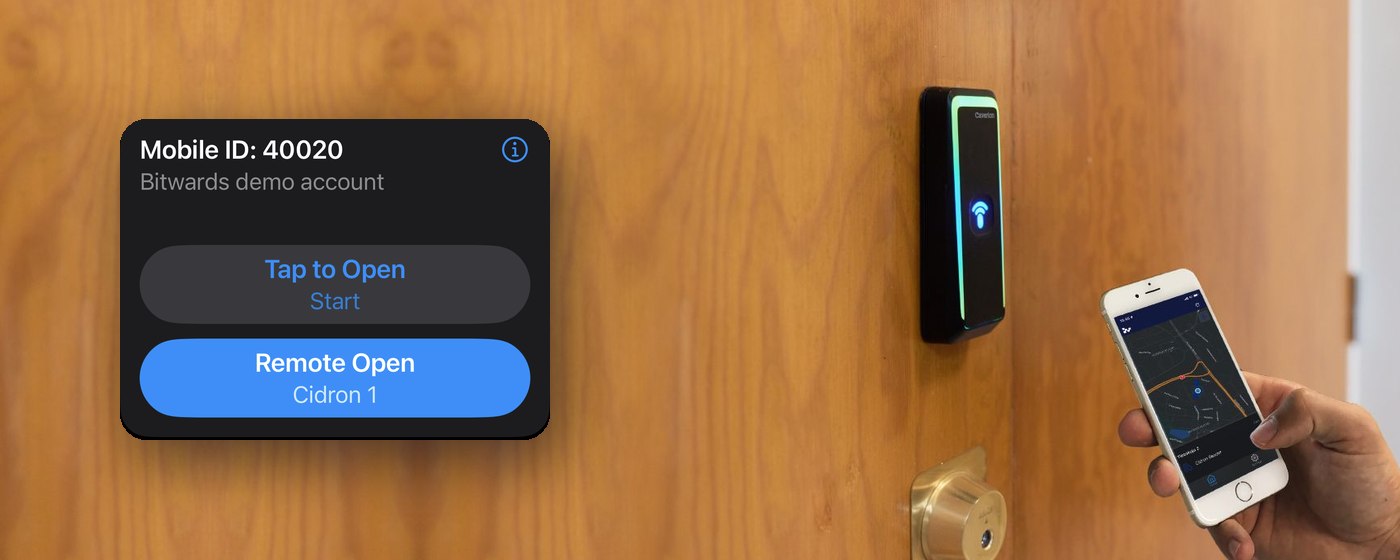
A wooden door with an access control reader on it and a phone held up beside it, with the mobile ID from the Bitwards ONE app shown alongside: the credential number, the account it belongs to, and its tap-to-open and remote-open buttons

Keep the system you have.
Retire the plastic.

Bitwards Mobile ID transforms your physical RFID credentials into digital mobile credentials. Your organisation can use phones as credentials at the doors controlled by the access control system you already own — and the mobile credentials co-exist with the RFID cards and other tokens already in use. The service connects to any access control system and works with readers from a range of manufacturers. Credentials are managed in an easy-to-use cloud dashboard, or through an API integration.

Your system staysReaders, controllers and software all keep working exactly as they do now.
Cards keep workingPhones and cards run side by side, so you can move people over gradually.
Several systems, one screenAdding a new access control system is fast, and the service adapts automatically to that system's credential format.
Issued automaticallyManage credentials in the cloud dashboard, or provision them straight from your own systems over the API.

Two versions of Mobile ID

  • Universal Mobile ID works like a physical RFID card: the user touches the reader with the phone to authenticate. Easy and flexible for administrators, with no extra steps or configuration — a large campus, for example, benefits from giving every student a Universal Mobile ID instead of an access card.
  • Door-based Mobile ID limits a user to certain doors and displays those doors in their app. Useful for delivery and logistics people, who are given only the access points they need and can see clearly which ones they may use.

Various credential options

  • Reusable credentials are renewed each year and can be transferred between users as needed, which keeps a rolling intake flexible.
  • Single issue credentials are permanent and fixed to one phone.

Multiple access control systems

Control mobile credentials for several access control systems from a single dashboard, so a customer with different buildings on different systems manages them all through one interface.

The full distribution chain

Several levels of distribution are supported, so credentials move efficiently through the whole value chain: distributor, value added reseller and end customer each have their own role.

Full transaction history

Every credential transaction is tracked, giving a complete audit trail across all customer accounts. The system notifies of expiring credentials and keeps the administrator informed of available credentials and stock.
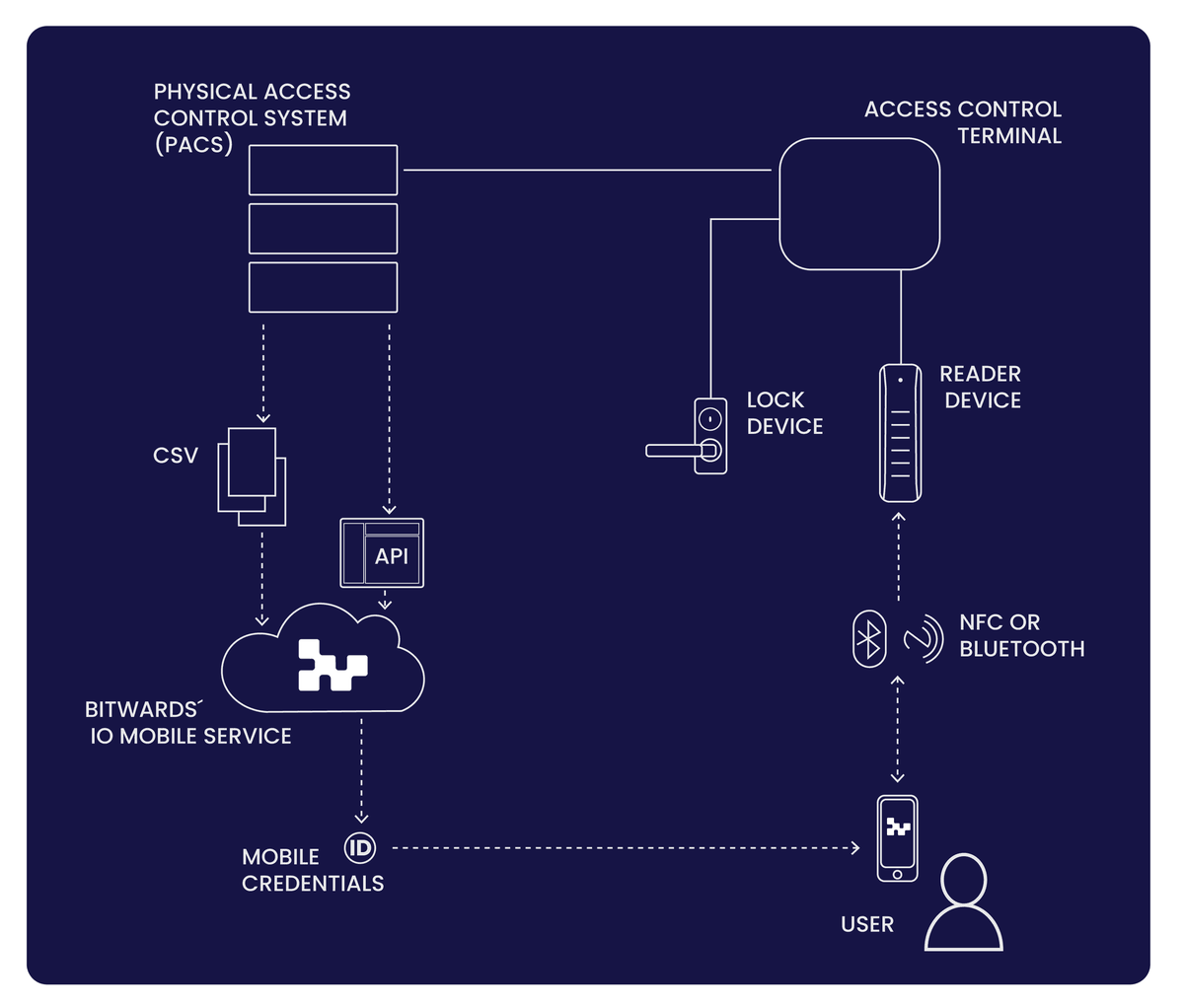
How Mobile ID works: the physical access control system (PACS) passes credential data to the Bitwards.io mobile service by CSV file or API. The service issues a mobile credential to the user's phone. At the door the phone talks to the reader device over NFC or Bluetooth, the reader reports to the access control terminal, and the terminal opens the lock device.
Mobile IDs are an alternative to physical smart cards in a Physical Access Control System: generated in the cloud service, transferred to the user's phone, authenticated at the reader over NFC or Bluetooth, and passed on to the access control terminal, which decides whether to grant access.
Technology Licences
A third-party app opening a door, with the Bitwards SDK inside it

Not a closed system
with a phone bolted on.

Bitwards was built to be embedded. Hardware manufacturers build it into their locks, software vendors build it into their services, and customers connect it to the systems they already run. The embedded library integrates with virtually any hardware; the REST APIs connect Mobile Access and Mobile ID to any third-party application; the app SDK puts door opening inside any third-party mobile app. The whole solution is also available completely white-labelled.

Firmware library

A small embedded library goes into your firmware and makes your lock, reader or controller speak Bitwards. Your product joins a catalogue every Bitwards partner can already sell — dozens of European manufacturers ship Bluetooth and NFC devices that work on the platform.

Open API

Create users, grant and withdraw rights and read event data from your own systems — provisioning, HR, property management or a service portal. Workplace, campus and coworking platforms already integrate, so a booking, an enrolment or a membership can grant a door without anyone touching the access system.

Mobile SDK

Put door opening inside your own iOS and Android app, so your tenants or members never leave your brand to get in. Available fully white-labelled: the service and the app can carry your own identity where the access experience is part of what you are selling.
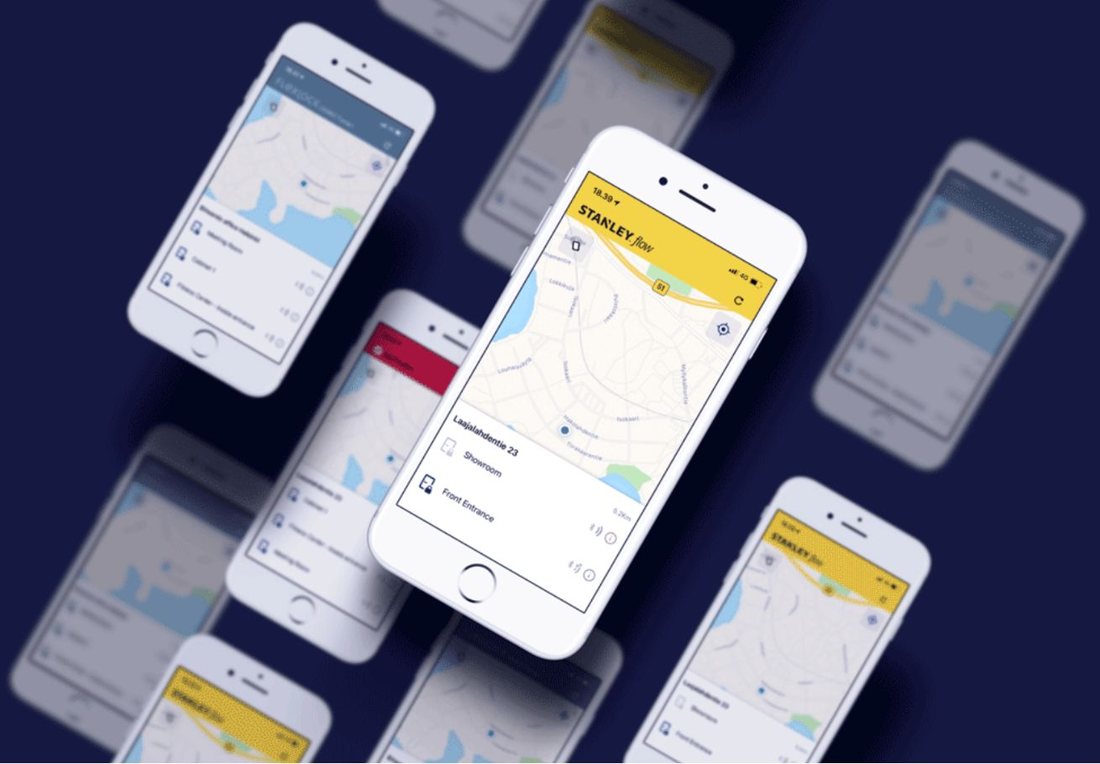
A set of phone mockups showing the Bitwards access experience inside several differently branded apps
The same access experience, carrying someone else's brand. Corporate login through Microsoft Entra ID and other OAuth 2.0 identity providers is part of the package, so people use the account they already have and groups stay in step automatically.

Multiple roles and service levels

The platform supports the full value chain, from manufacturers to end customers and users. Distributor, value added reseller and end customer each get their own role, which separates the features and tasks each one needs and keeps distribution and management secure and simple.

Want the licensing detail? Use the Join as a partner button below and tell us what you build — we will come back with the terms that fit it.

Need more information?

Whether you manage buildings, install access for a living, or make hardware that should be smarter — we'll point you to the right answer, or to the right partner near you.
Download documents

Download documents

Choose what you'd like and we'll send it over. Nothing is sent to you beyond what you ask for here unless you tick the last box.

Documents
Phone optional

Request more information

Tell us a little about your doors and we'll come back to you — or put you in touch with the Bitwards partner nearest you.

Phone optional

Join as a partner

Bitwards is sold, installed and supported by partners in each local market. Tell us what you do and we'll come back with how the platform fits it.

Phone optional
Mahtinokka car park · success story Open as a page

Success story · Parking

Two hundred spaces, and nobody winds down a window

A new two-storey garage under a condominium in Matinkylä, Espoo — opened from the phone as the car rolls up to the gate, with no key, no fob and no reason to stop.

A driver holding a phone showing the Bitwards app, the garage entrance visible through the windscreen
One tap as the car nears the gate. Nobody gets out.

The condominium opened in August 2021 with a two-storey garage of 200 parking spaces, planned from the start to be easy to get into. The building company bought four electric locks from Arvolukko and put them on the Bitwards platform. Users open the doors from the app, or with a PIN on the panel beside them. Keys and remote controls are not part of the arrangement.

A smooth user experience

Mauri Mononen and Pirjo Suhonen have two spaces in Mahtinokka. He drives daily; she leaves the car for weeks and uses it a few times a month. Both report the same thing: it simply works, and neither of them has to step out of the car.

“I have used Bitwards for three weeks. The use of the app is easy, and I don't need codes or keys anymore. I always have my phone on me, so the access is smooth now.”

Mauri MononenResident, Mahtinokka

Access rights granted. Fast.

Sannamari Isosomppi works in the maintenance unit and is one of the administrators of the system. She creates the groups, grants the rights and supports the users.

“I created a user group to which I have added the end-users of the garage. The online service is straightforward to learn and user-friendly.”

Sannamari IsosomppiMaintenance unit, Mahtinokka

Residents rent their space on a monthly contract, which is where the turnover comes in — and where handing over physical keys used to cost everyone an appointment.

“Residents do not need to come and pick up or leave their keys. They just have to download the Bitwards mobile app, and register as users; then I provide them with the access rights online. If the contract comes to an end, I just have to revoke the access rights of the resident from the group.”

Sannamari IsosomppiMaintenance unit, Mahtinokka

What the garage got out of it

  • One app for access — no keys, no remote controls.
  • No internet connection needed at the door.
  • Mechanical and electric locks alike can be brought onto the platform.
  • Access rights administered in real time from the cloud service.
  • Competitive to install, with no wiring.
  • Security tested.

Originally published by Bitwards, 21 February 2022.

CatMarina · case study Open as a page

Case study · Coworking

CatMarina: book, pay, walk in

Twenty-two meeting rooms in a new office and coworking space in Lahti — and a plan, at first, to hand out keys for all of them.

The CatMarina coworking lounge: coffee machine, high tables and seating under pendant lights
CatMarina, Lahti — open to members, customers and visitors, with nobody minding the door.

CatMarina started in the furniture business in the 1970s and has become a significant property player since: an indoor sports arena in Hollola, floating villas and saunas, and now an office and coworking space. Its founder and CEO Heimo Hälikkä has always been curious about new technology, and the brief for the new space was a safe, user-friendly experience for everyone in it — which meant access had to be controlled and manageable.

Twenty-two rooms, and the key drawer that never happened

The first thought was traditional keys. Then somebody counted the rooms.

“We should have employed someone full time just for handling access authorizations, handing out keys and keeping a log book to track users or chase forgetful customers, not to mention having to order expensive service to replace all the locks because of lost keys. We started to look for alternatives.”

Jenni MattilaSales, CatMarina

Security first

Mobile keys turned out to be the safer option as well as the easier one. The doors to the building stay closed; only authorised people open them; once inside, people move freely between the rooms they have rights to.

“Security is essential for us. Bitwards Mobile Access ticked all the boxes concerning security and safety, as it allows controlling the flow of who is accessing the premises at all times, making it a safe environment for our customers to work in because we know that keys cannot end up in the wrong hands. We can deny access if deemed necessary.”

Jenni MattilaSales, CatMarina
An ordinary-looking white office door standing open, with a plain lever handle
The doors look like any other doors. The intelligence is inside the lock.

Why Bitwards, and why Asio

“We chose Bitwards because Bitwards could deliver fast and accommodate our needs. They also had an integration with Asio, which provided the online booking system that our customers now use to reserve meeting rooms. Customers, staff, cleaning service crews, and occasional visitors could immediately access the premises by downloading the app.”

Jenni MattilaSales, CatMarina

There was one small problem early on, not of Bitwards' making. It was found and fixed quickly, which Mattila counted as the more useful proof: “It's comforting to know that if bigger things arise in the future, we can rely on prompt, responsive and competent customer service, which is so rare nowadays.”

Book, pay, access

Diagram of the book-pay-access flow between the Asio web service, an online payment service, the Asio cloud service, the Bitwards mobile service and the door
The whole transaction, end to end — no phone call, no email, nobody handing anything over.
  • The customer books a room or a space, for the time they want, in the Asio web service.
  • They pay for the booking through an online payment service such as Paytrail.
  • Asio authorises the Bitwards Mobile Access service to issue the rights.
  • Bitwards sends the rights to the mobile application.
  • The customer opens the booked space at the booked time.

Asio is a Finnish IT company specialising in booking management for schools, cities and municipalities, restaurants, business parks, parking halls and lodging — spaces, rooms, classrooms, parking spaces, devices, times and events. Because the API integration between Asio and Bitwards already exists, a deployment like CatMarina's is a matter of configuration rather than construction.

Who would Jenni Mattila recommend it to?

“I recommend implementing Bitwards Mobile Access in any office with more than one employee. It is unquestionably worth the initial investment. For example, we will never have to go through any costly key replacement operation. The system works; employees don't have to make an appointment to meet customers to hand out keys or to remind people to return them. I would also recommend it to Airbnb owners: customers book and pay online and are granted access to their app in a few minutes.”

Jenni MattilaSales, CatMarina

CatMarina is now considering the same arrangement for bookings of its floating villas, and for storage rooms.

Text: Katariina Benedetti. Graphics: Bitwards / Susanna Määttä. Originally published by Bitwards, 9 February 2023.

Ylva · case study Open as a page

Case study · Property owner

Ylva: one portfolio, every kind of tenant, one key

Residents, office tenants, gym members, bands, guests and a construction crew — all in the same buildings, and until recently all on different access control systems, or none at all.

Ylva is owned by the Helsinki Student Union. Its purpose is to enable a vibrant student life, and it has been part of Helsinki's cityscape for over 150 years. It owns some of the city's most recognisable buildings: the Old and New Student House, and Domus Academica, the housing complex where generations of students have lived.

The atrium of a Ylva property, a curved balcony above a stairwell and a wall of tall windows
One complex, many kinds of space — and, until recently, many kinds of lock.

Challenge one: the common areas

Domus Academica is three distinct housing properties, plus commercial space, conference rooms, a laundry, shared areas and a garage — with Aalto University Executive Education as a tenant. A complex that heterogeneous is exactly where traditional access control becomes costly and awkward, and where PIN codes quietly stop working.

“We share the basement, sauna and laundry room. We used to have a PIN-code system, but the readers have been removed due to the codes ending up in wrong hands.”

Markus ThoméProperty manager, Ylva

“Crossing from one building to the other is challenging, as there are different access control systems or no access control system at all. The intricacy of the systems affects people's everyday life and overloads the administration, as we need to manage access control in many different systems simultaneously, which is costly and slow.”

Markus ThoméProperty manager, Ylva
The Domus car park, bicycles racked against a white brick wall under the lit Domus sign
The garage: shared by residents, tenants and, for a month at a time, a renovation crew.

Challenge two: the tenants

Outside tenants are a user group of their own — a gym with 3,000 customers and its trainers, and band rehearsal rooms that want a booking system worth the name.

“The gym has 3000 customers plus the trainers. The band rehearsal spaces would like to have an efficient booking system. The access control currently in use is obsolete and confusing. We are in charge of it, but we'd like the gym and the rehearsal space to manage access independently.”

Markus ThoméProperty manager, Ylva

What Ylva wants next

The ambition is a tenant who never carries a key at all: one login that opens the laundry, books a sauna shift, an office or a party venue, reports a maintenance need, shows the house rules, or reserves a turn at the shared car.

Laundry, common areas, garage, gym — done

Mobile access is already running in the common areas, and the administrative load has fallen with it.

“The app is easy to use, and the admin work has reduced dramatically. Misuse has diminished, and tenants have been mostly very pleased. The common areas in the guest house have a mobile key. It's so convenient not to have to hand out keys, and that access rights go straight to users' phones and are valid for the agreed time.”

Markus ThoméProperty manager, Ylva

The gym's trainers have started using the mobile key too, and would like to run their own access in future.

“One clear example of how much easier daily life has become is that we have one-month-long renovation works starting soon, and with the app, I was able to assign access rights to the crew, for example, to the garage for the duration of the project. How incredibly easy is that? It is a relief to know that keys will not be forgotten somewhere, in the pockets of the construction crew members or on their desks. We don't have that problem anymore.”

Markus ThoméProperty manager, Ylva
A man walking to a side entrance with his phone in his hand, past the old keypad on the wall
The keypad on the wall is what the phone replaced.

Next

NFC on Android makes the phone behave like a keycard — show it to the reader and the door opens — and that is due to be tested in the Ylva property. Beyond it lie the apartment doors themselves, which would take the friction out of moving in: access granted when the lease is signed and withdrawn when it ends, rather than a tenant racing the lobby desk to arrive before four o'clock.

Who would Markus Thomé recommend it to?

  • New builds — construction companies should consider access control based on mobile technology from the start.
  • Any property renewing its locks or its obsolete access system, or considering mobile access.
  • Any property with a problem of unauthorised people getting in.

Text and editing: Bitwards / Katja Sonninen. Translation: Bitwards / Katariina Benedetti. Originally published by Bitwards, 25 May 2023.

CoSpace Finland · success story Open as a page

Success story · Coworking

A former bank in Porvoo, opened by phone

CoSpace Finland rents workspace by the hour. That only works if getting in is as easy as booking — so the old access control system went, and the phone became the key.

The CoSpace ONE building in the centre of Porvoo on a winter evening, lit up in the snow
CoSpace has occupied this building — an old, rather grand former bank — in the centre of Porvoo since 2017.

CoSpace Finland Oy offers coworking space to companies and to individuals: desks, workspaces, meeting rooms, seminar rooms — and a sauna. Customers get high-speed internet, printing, copying and scanning. Space can be booked for as little as two hours.

That last detail is the whole problem. When customers arrive and leave all day, for stays measured in hours, access control has to be effortless to run and impossible to get wrong. CoSpace had been looking for a system that could keep up, and not finding one.

“We rent the selected space for a minimum of two hours, and because of customers coming and going, access control has to be smooth and easy to manage.”

Petter LarsenCEO, CoSpace Finland

From a conference conversation to a live building

Petter Larsen met Bitwards CEO Eljas Saastamoinen at an international conference and heard about the platform there. CoSpace adopted it in 2018, becoming one of Bitwards' first customers — and Mobile Access replaced the legacy access control system in the building outright.

A hand holding a phone showing the CoSpace doors in the Bitwards app, beside an open office door
Every door in the house — the HUB entrances, the third-floor open office, the restaurant — is a line in the app.

“The Bitwards solution suits our needs perfectly. The technology is safe, reliable, flexible and user-friendly. There is no need to physically meet a customer, as it is possible to allow access remotely. The user-friendliness is of particular importance to us because many of our customers occasionally need to use the facilities only for a short time.”

Petter LarsenCEO, CoSpace Finland

And then the building across the street

The second test of an access system is what happens when you add a building. CoSpace opened a HUB — a meeting and teamwork space — directly opposite, and put it on the same platform, with lockers under consideration after that.

“Another big advantage of this system is that it is scalable. We have already implemented the smart key platform in a building that we opened just opposite CoSpace.”

Petter LarsenCEO, CoSpace Finland

Today the Finnish high-tech company Lamor Plc works from the same premises — a tenant of a different size and kind, on the access control that a two-hour meeting-room booking already proved.

Porvoo old town at dusk in winter, wooden houses and the cathedral above the river
Porvoo old town, a few minutes from the door.

Quotations from “Bitwards converts smartphones into keys” by Tuomas Lehtonen, published in Ilta-Sanomat on 13 March 2021; English translation by Katariina Benedetti.

Aalto University · success story Open as a page

Success story · University

A mobile phone as the key to the Otaniemi campus

Aalto University and its property company ACRE are moving a campus of more than 2,000 access-controlled doors from plastic cards to mobile IDs — a piece at a time, at the pace the campus itself can take.

A hand on a brass door handle with a Bitwards reader in it, showing green, while the other hand holds the phone that opened it
The credential lives on the phone; the lock in the handle decides for itself whether it is valid.

Otaniemi is not a building, it is a small town: around 15,000 students and 4,000 staff, spread across a campus with more than two thousand access-controlled doors. Once mobile IDs are the norm, the number of credential holders will approach twenty thousand.

The aim Aalto set was “invisible access control” — a campus where getting through the right door takes no thought at all, while the doors meant to stay closed stay closed. The transition away from physical cards has been deliberately gradual, following the readiness of the people who use the campus rather than a switch-off date.

“Access control is a central element of the campus experience and security. Every member of the Aalto community should be able to move as effortlessly as possible, while ensuring that doors meant to remain closed do stay closed. Today, many people already have a smartphone with a calendar, wallet and all essential applications — so why not also a key for moving around campus.”

Ville JokelaManaging Director, Aalto University Properties Ltd (ACRE)

Seven years of joint development

The mobile ID pilot began in 2019, in the university's coworking facilities across five campus buildings. That was the point of it: to test the system against a genuinely broad user base and adapt it to a campus environment, rather than to a demonstration. The brief was to simplify the access-control processes, improve security, and bring the cost down. The joint development work between the university, ACRE and Bitwards is still running.

Mobile ID also changes what a change costs. Rights can be updated and modified without anyone reissuing a card, and the same credential can be extended beyond doors — to storage lockers, or to equipment.

Why the architecture matters at this size

The technology behind the mobile ID solution has its origins in Nokia's former research centre, which itself worked closely with Aalto over the years.

“Security is at the core of Bitwards' operations. The system is based on distributed intelligence, allowing locks to evaluate the validity of encrypted mobile identifiers. The Bitwards solution offers almost unlimited scalability for different applications and use cases.”

Eljas SaastamoinenCEO, Bitwards

That distribution is what makes a campus of this size practical. The lock decides, on its own, whether a credential is valid — so the door does not depend on a cable, a controller, or a live connection to a server to do its job.

Where it stands

Aalto now recommends the mobile credential to every member of the community, students and staff alike. The count passed ten thousand users in autumn 2025 and reached sixteen thousand a year later. Aalto has had positive feedback and development ideas in roughly equal measure, and reviews the awkward cases one at a time — which is what a seven-year transition on a live campus actually looks like.

Read Aalto’s own article →

Facts and quotations from “Mobile phone as the key to campus”, published by Aalto University on 6 October 2025.

University of Helsinki · success story Open as a page

Success story · University

Enriching the educational experience of the students of the University of Helsinki

The craft science and education department of the faculty of educational sciences opened its new premises in 2021. Bitwards provides easy and secure access throughout.

The department’s wood workshop, with a planer and a panel saw and floor markings around each machine
The new premises opened in 2021: three floors of workshops, equipment rooms and machines.

The department welcomes students who need to work on their projects at varying hours. Staying in the lab for a short while, or spending hours there to finish a project on time, can be critical — and needs access that is both easy and secure. These students will one day graduate to become class teachers in primary and secondary schools in Finland, where technical work is part of the curriculum.

It was clear that granting access to hundreds of students every year by handing out physical keys was impossible. The department occupies three floors and is served by a lift. There are several sizeable machines that students learn to operate and need to reach. The question was how to ensure that only authorised people could enter the premises and use the machines safely and independently.

Making access easy and secure

Erno Vähänen, the senior laboratory technician, cares for the machines, works as a supervisor, and administers the Bitwards platform, assigning access rights to the students.

“From the first year, students get access rights to the doors so they can freely get acquainted with the spaces. When their study progresses, they have to pass theory and practice tests to operate the machines. These tests are strict, because many of the metal and woodwork machines can be dangerous if not operated appropriately. Once the students pass, they get access rights to the machines of the department. Thanks to Bitwards, they get to practise on their own.”

Erno VähänenSenior laboratory technician

Security above all

In case of need, he or another supervisor is always there. The Bitwards solution is aimed specifically at high-risk machines, such as the planer, the band saw and the circular saw.

“The best thing for me is that I can feel safe when the students are working with the machines. I know that only authorised people can access them, and that those people know what they are doing. Bitwards gives me a sense of security.”

Erno VähänenSenior laboratory technician
A user in a face shield and ear defenders unlocking a machine with the Bitwards app
The high-risk machines — the planer, the band saw, the circular saw — unlock from the phone, and only for someone who has passed the tests.

Senior lecturer Antti Hilmola finds the platform straightforward: “I particularly enjoy the fact that we can grant easy and secure access rights to anyone. And that we can decide on the timeframe. I think this system could be particularly suitable for vocational schools or universities of applied sciences.”

Students and modern access control

During a visit to the campus we interviewed a few students, touring the premises by opening doors with the Bitwards app.

“The biggest plus is that we can move freely on the campus; once the app is on our phone, we do not require any keys to open doors or cards for the lift,” says Inka Hissa, a first-year student.

We followed two students, Melissa Lynch and Kreetta Uusitalo, to the material storage room in the basement, taking the lift and opening the doors with the app. There is no internet reception down there. Bluetooth lets the app work all the same — even underground.

“The connection might be a bit slower sometimes underground, but it always works and we think it’s great,” they say. The app has charmed students who, at first, wondered how it was possible to open doors and unlock machines with a touch on a phone screen.

The Bitwards app listing the department’s machines: band saw, router, CNC plasma cutter, pillar drill, laser station, circular saw
Every machine is its own access point in the app.

Text: Katariina Benedetti. Originally published by Bitwards, 19 December 2022.

“The door we left open” · Turvallisuus & Riskienhallinta 3/2026 Open in a new tab